Amplify Insight Rentals is a full-stack, white-label car rental management platform — built for agencies, exotic fleets, and franchise operators who need enterprise-grade operations without infrastructure overhead.
90+
API Endpoints
29+
Data Entities
5+
Payment Gateways
100%
Multi-Tenant
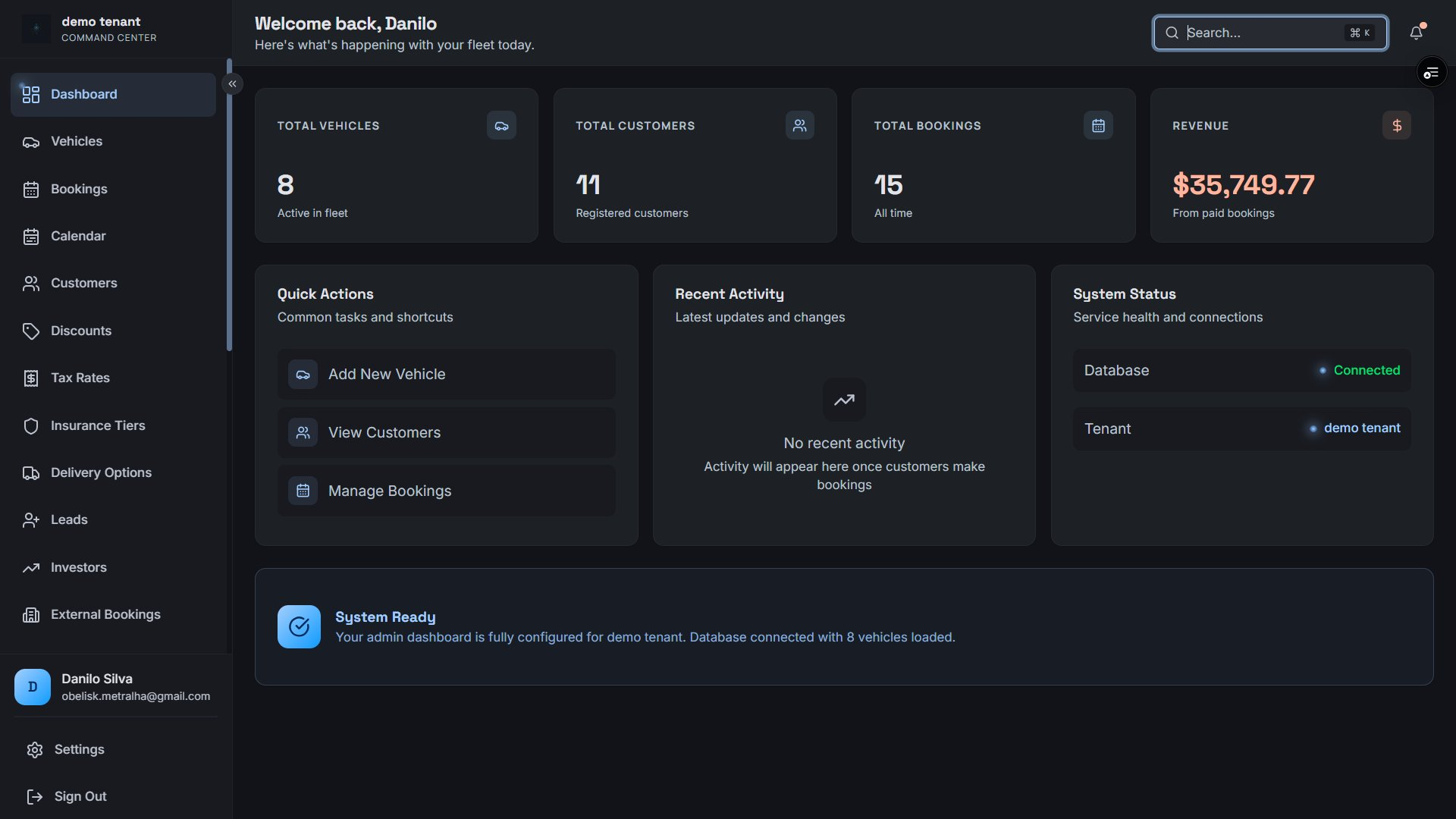
Command Center — real-time fleet metrics, quick actions, and system status at a glance
Core Feature
Fleet Management
Comprehensive vehicle lifecycle management — from onboarding a new car to tracking availability, mileage, damage, and media across your entire fleet.
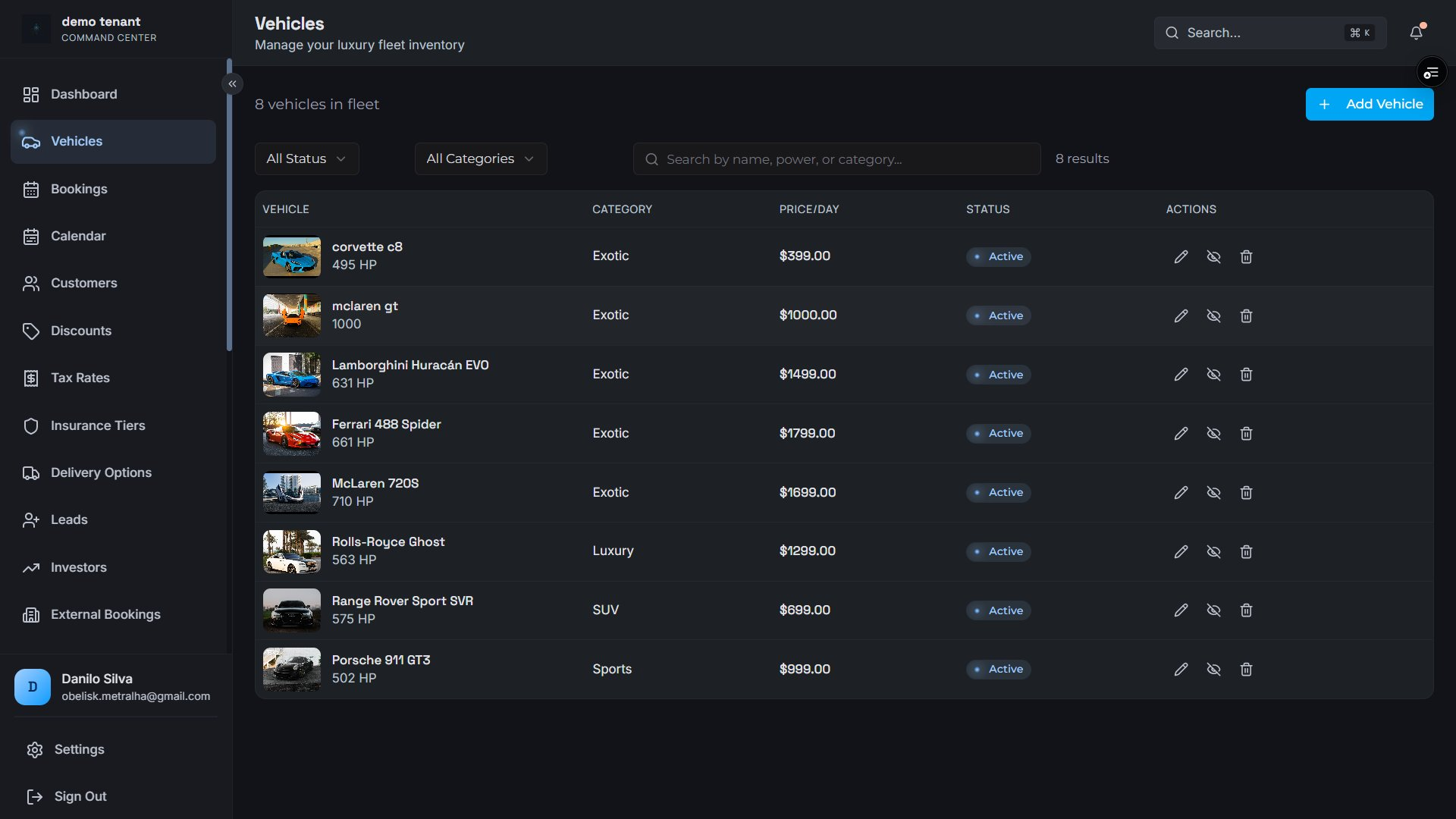
Fleet inventory — searchable table with category filters, daily rate, and per-vehicle status controls
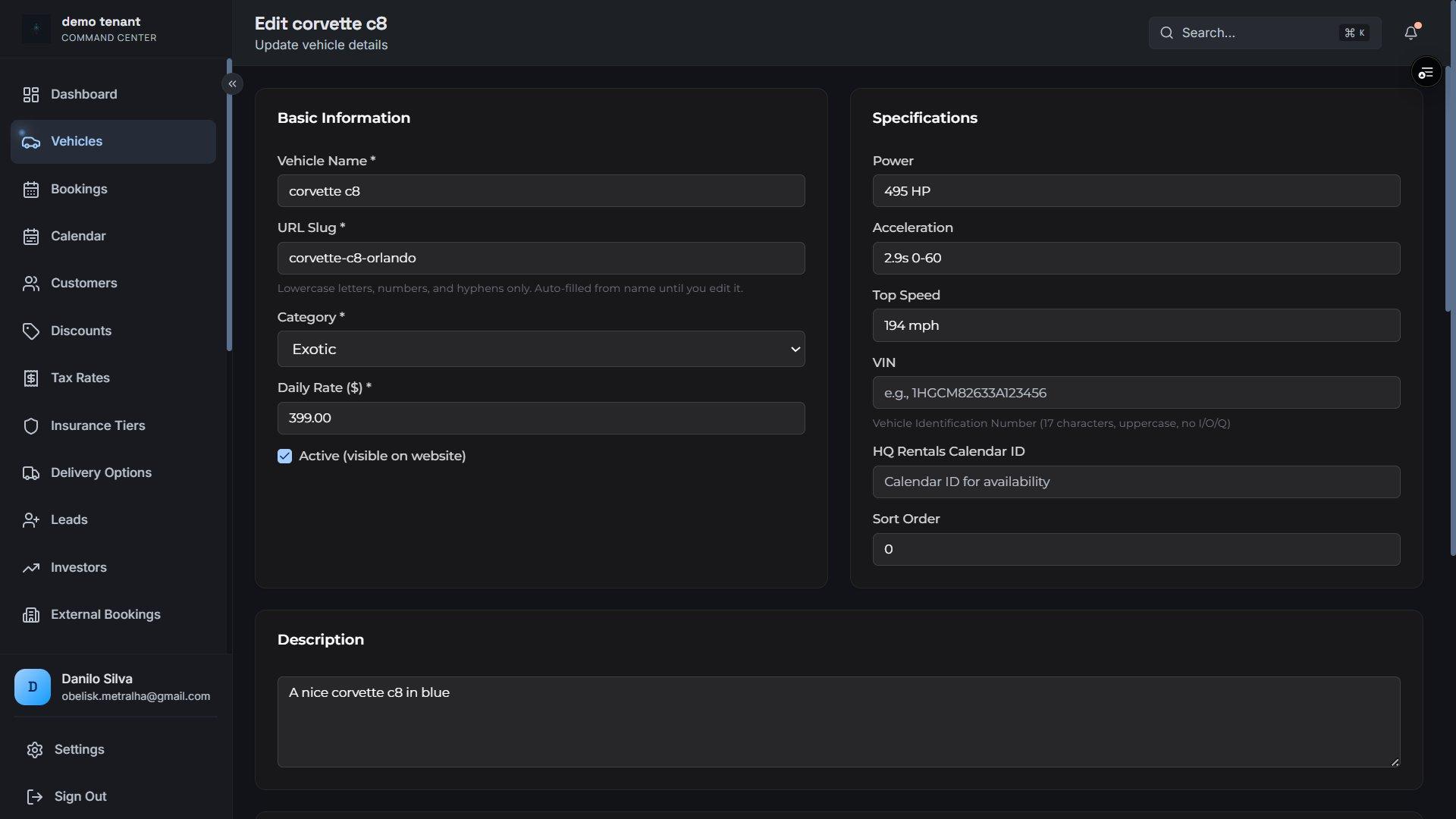
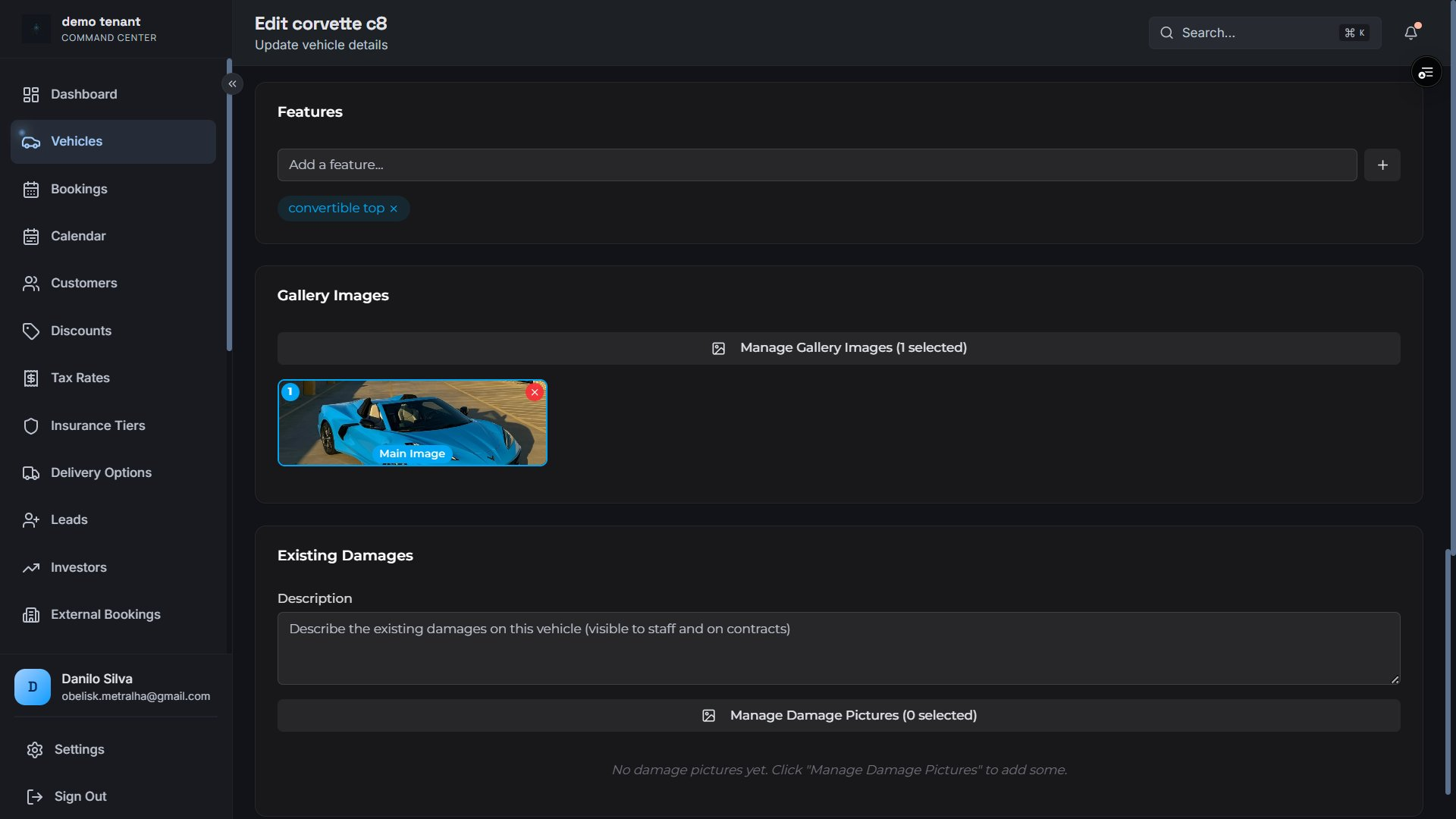
Vehicle Profiles
Rich per-vehicle records covering every spec your ops team and customers need.
Name, category, daily price, power, acceleration, top speed
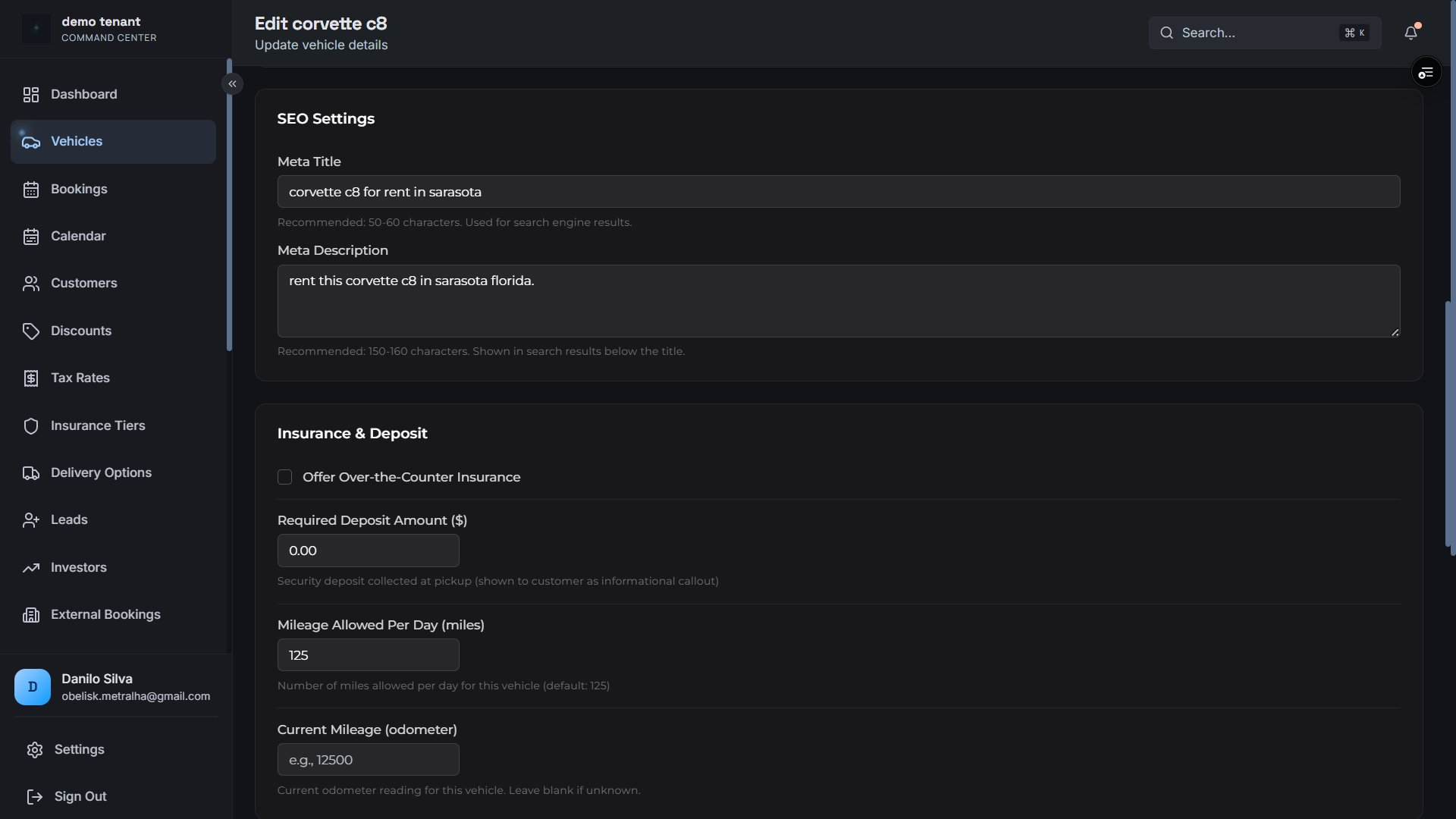
VIN, current odometer & daily mileage allowance
Featured image + unlimited ordered gallery
Features list, existing damage log, deposit amount
Media Management
Upload and manage vehicle imagery with cloud storage via Vercel Blob.
Hero / featured image per vehicle
Ordered multi-image gallery with sort control
Globally edge-cached — always fast
Admin image replacement and management
Availability Control
Per-vehicle calendar blocking so your public booking widget is always accurate.
Block date ranges per vehicle (maintenance, holds)
Auto-block from confirmed bookings
Public blocked-dates API for calendar UIs
HQ Calendar ID for external system sync
SEO Configuration
Built-in SEO fields on every vehicle so your fleet pages rank without a separate CMS plugin.
Meta title & meta description per vehicle
Focus keyword tracking
SEO-friendly auto-generated URL slugs
Damage Tracking
Pre-existing damage documentation stored on the vehicle profile to protect against disputes.
Structured damage description log
Damage photo gallery per vehicle
Displayed to customers pre-booking for transparency
Inventory Control
Keep fleet ops tight with mileage tracking and visibility toggles.
Feature tags, ordered gallery management, and pre-existing damage documentation
Core Feature
Bookings & Reservations
End-to-end booking lifecycle — from customer submission through active rental to completion, with full audit trail, document management, and team collaboration tools.
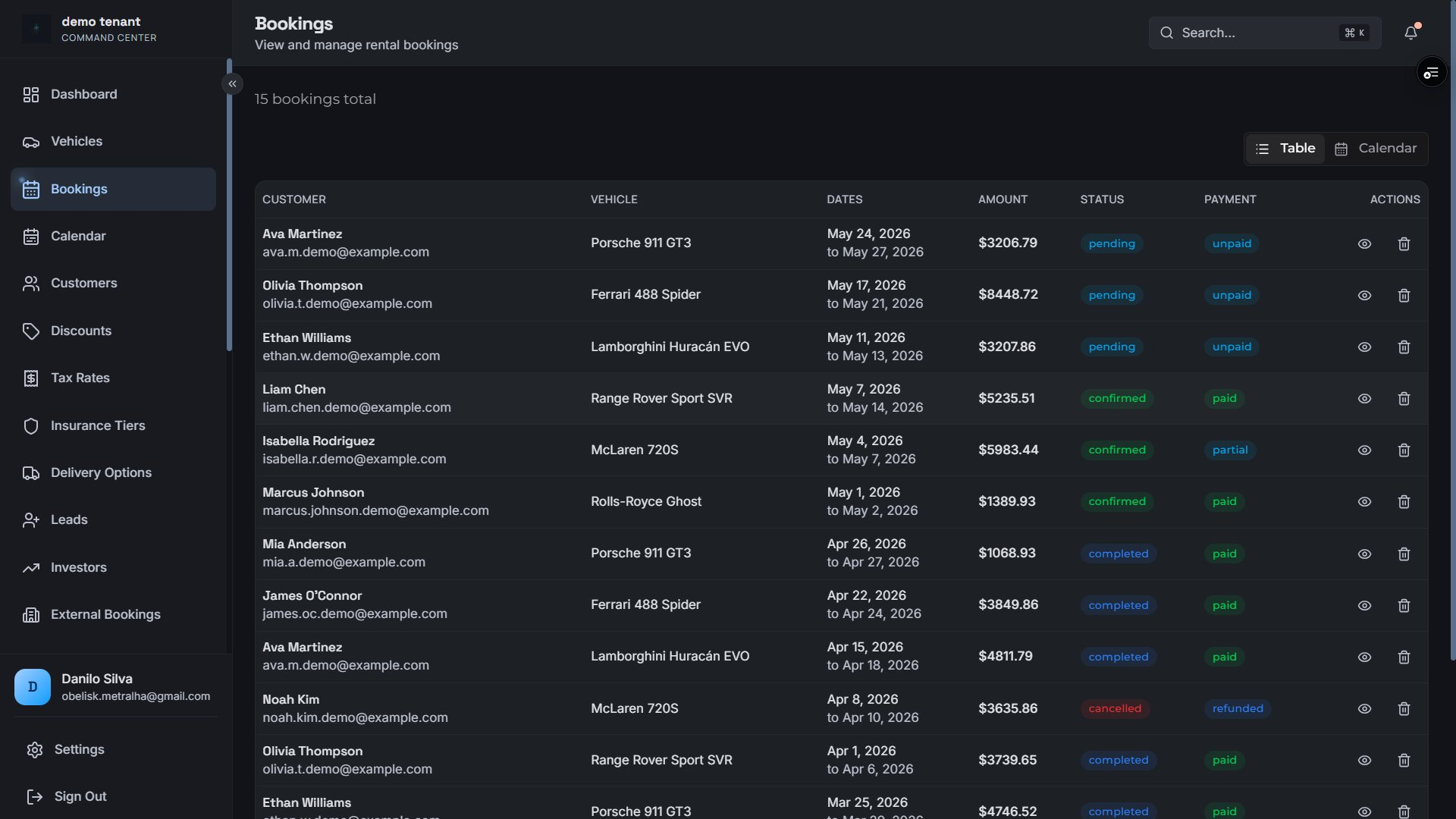
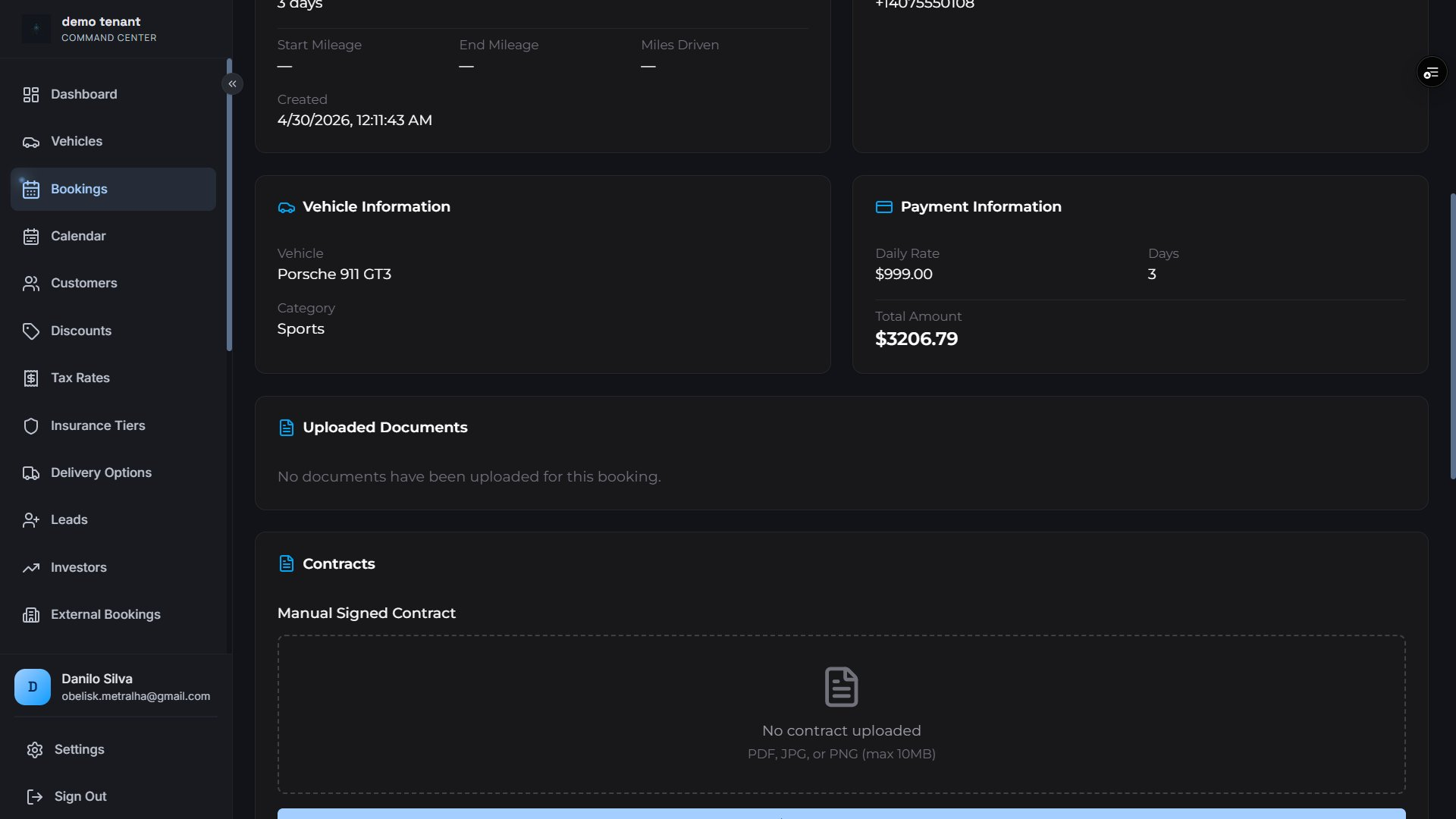
Bookings table — sortable by date, filterable by status and payment, with inline actions
Booking Creation
Two pathways, one unified dashboard
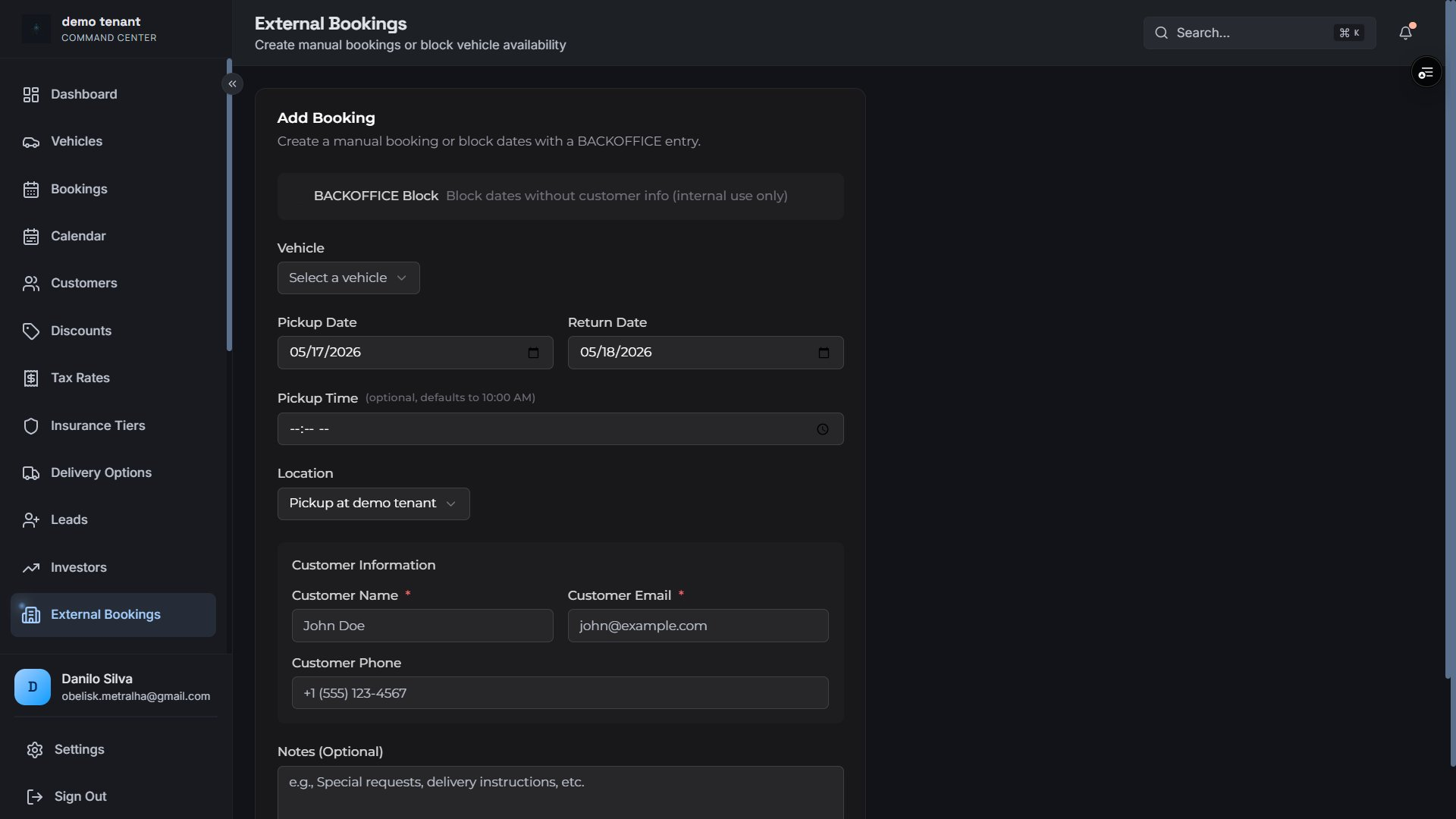
Website bookings arrive through the public API and require full documentation. Backoffice bookings can be created manually by your team for phone-in or walk-in customers — without the document gate.
Public API booking with license & insurance doc requirement
Manual backoffice entry — bypass document gate
Block vehicle dates without customer info (BACKOFFICE block)
Auto customer lookup or creation at booking time
Pickup date + explicit time flag, return date tracking
Manual booking form — create backoffice entries or block availability windows
Booking Status Lifecycle
Every booking moves through a defined state machine your team manages in real time.
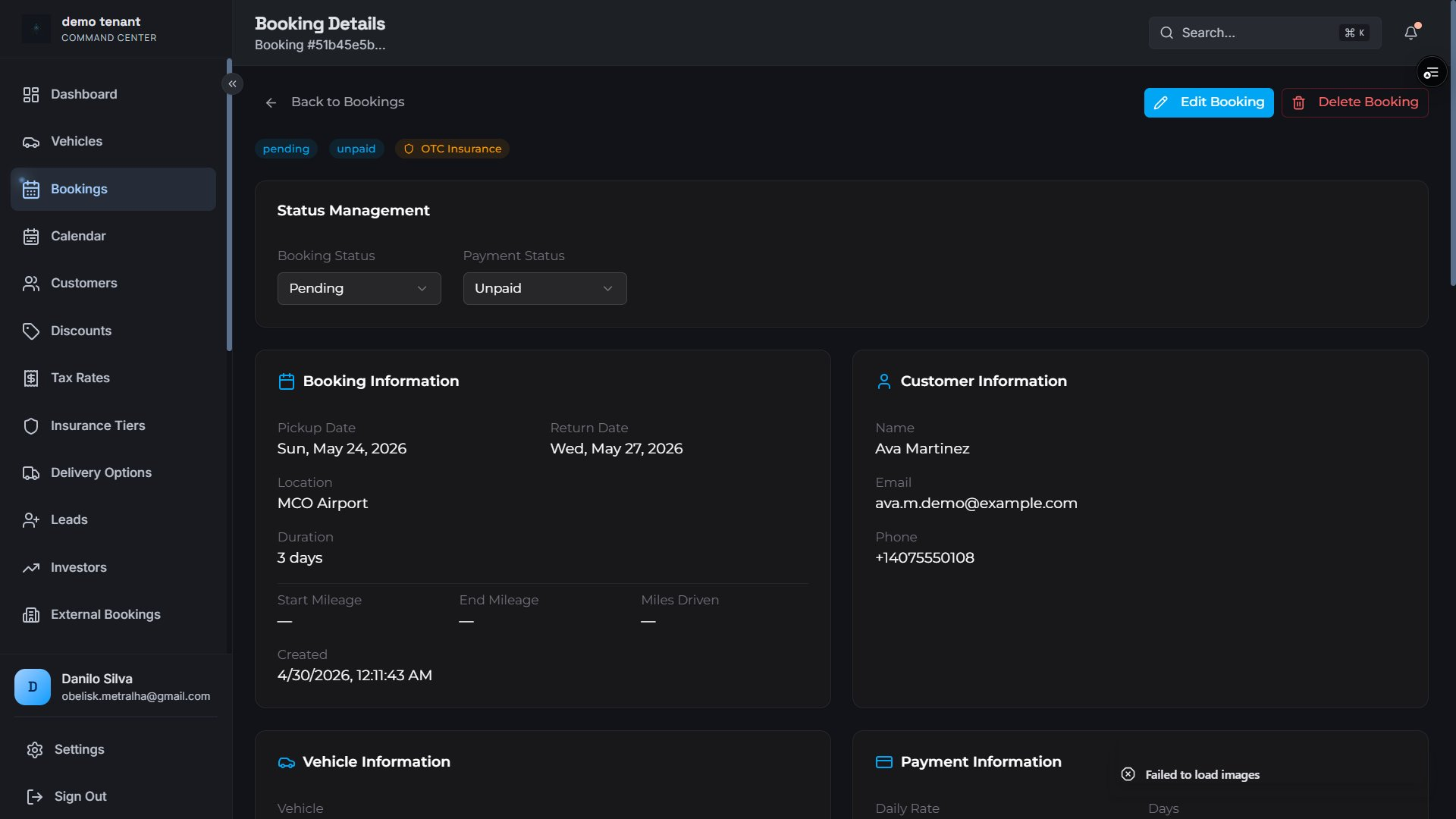
Every change is logged — who made it, when, and what changed.
Field-level change tracking (old → new values)
User attribution on every entry
Free-text staff notes per booking
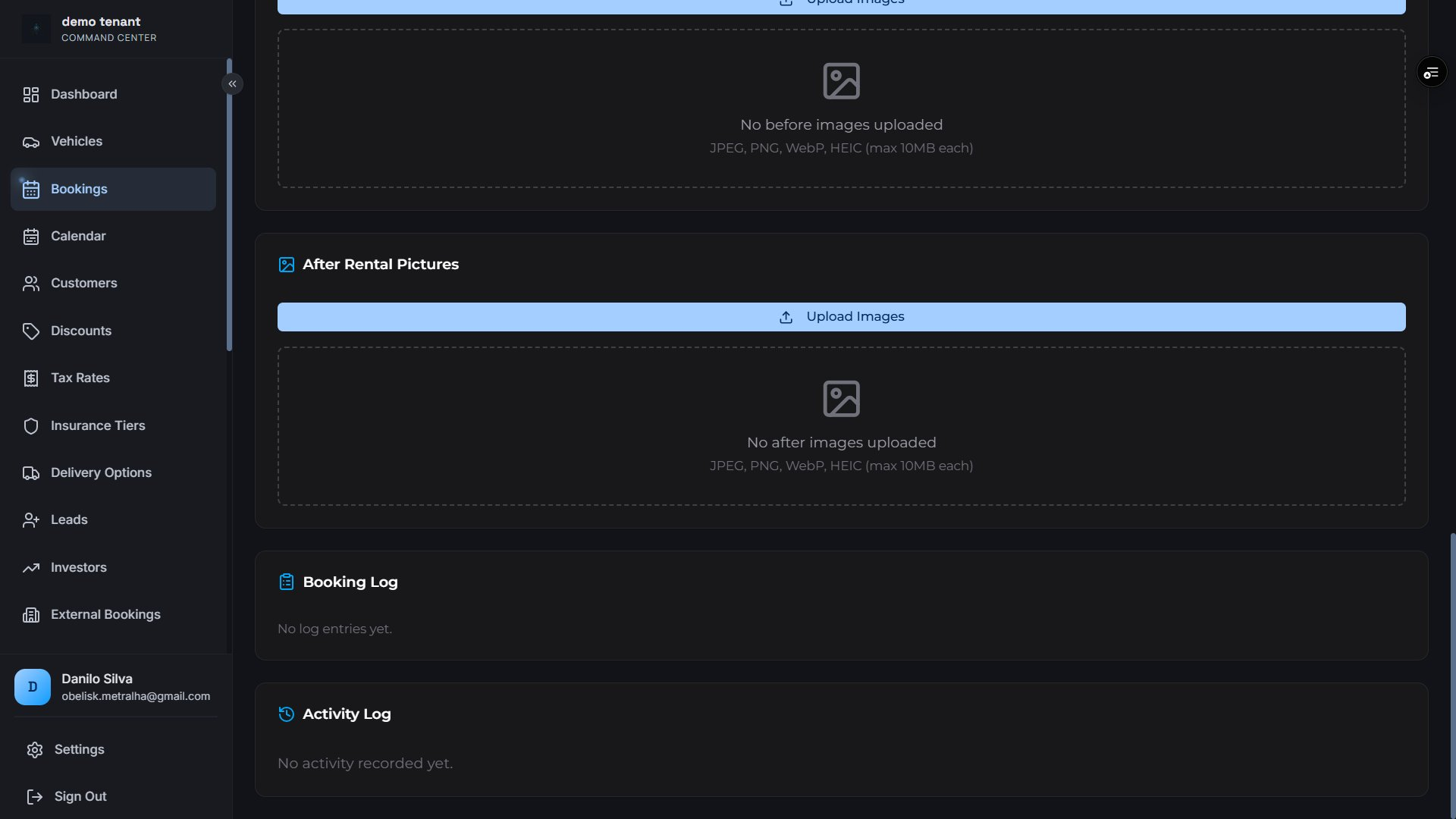
Rental Image Gallery
Document vehicle condition at pickup and return with an ordered image gallery per booking.
Before / after rental picture sections
Image type categorization (pickup, return, damage)
Uploader + timestamp tracking
Mileage Tracking
Track start and end odometer per rental to enforce daily limits.
Start mileage snapshot at pickup
End mileage recorded at return
Miles driven automatically calculated
Document Uploads
Customers submit license and insurance documents as part of the booking flow.
Selfie with license, front & back scan
Optional insurance card & declarations
Admin manual contract upload
Vercel Blob storage with URL tracking
Customer Status Tracking
Customers can check booking status without logging in — just the booking ID.
Public status endpoint (no auth required)
Real-time updates as you manage the booking
Payment status visibility
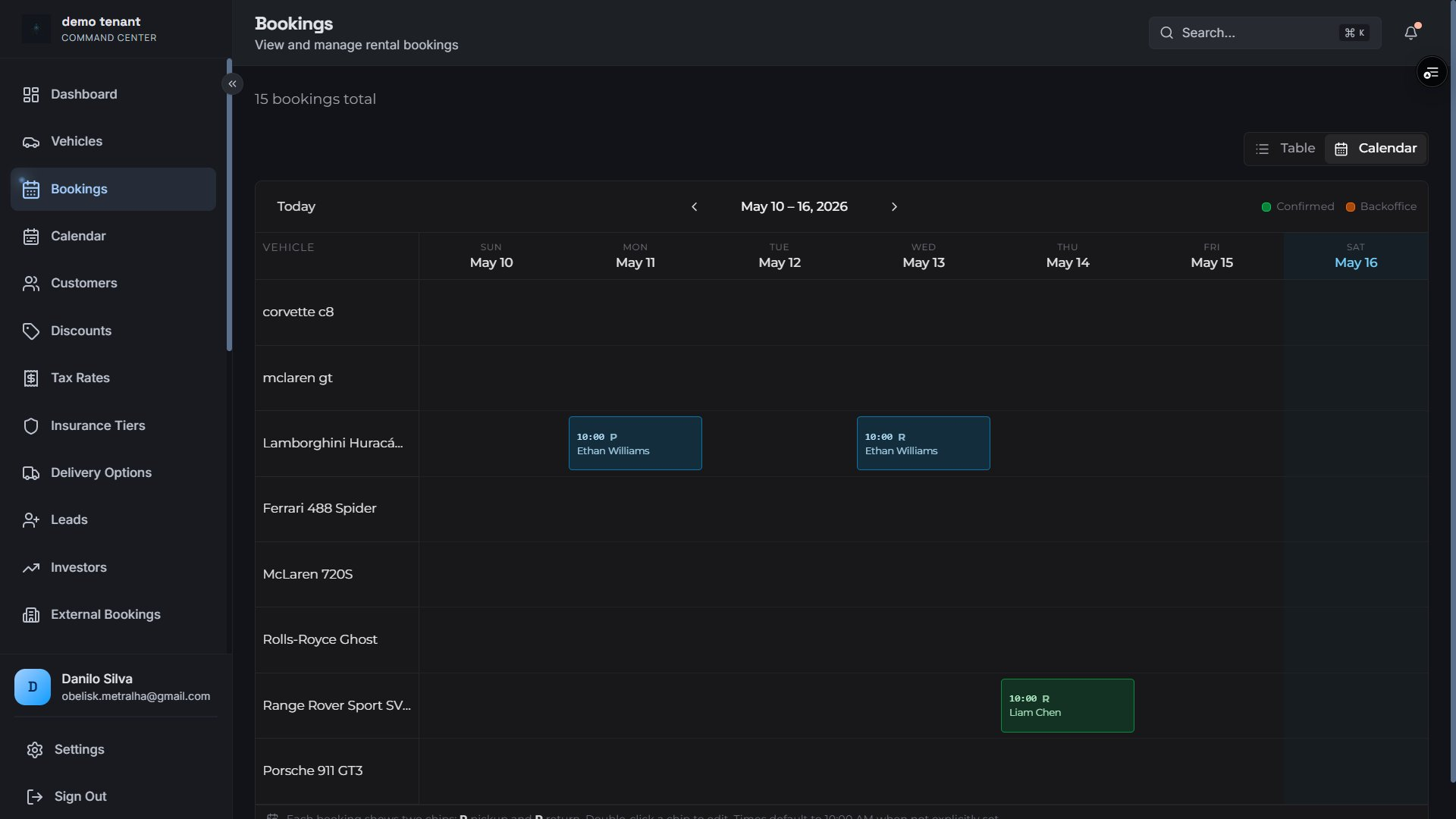
Fleet Calendar View
Visualize all bookings across the entire fleet on a weekly timeline.
Per-vehicle row — cross-fleet at a glance
Pickup and return events color-coded
Confirmed vs. backoffice distinction
Click any event to open booking detail
Before & after rental pictures, booking log, and full activity audit trail
Fleet calendar — weekly timeline showing every vehicle's pickup and return schedule
Revenue Ops
Pricing & Discounts
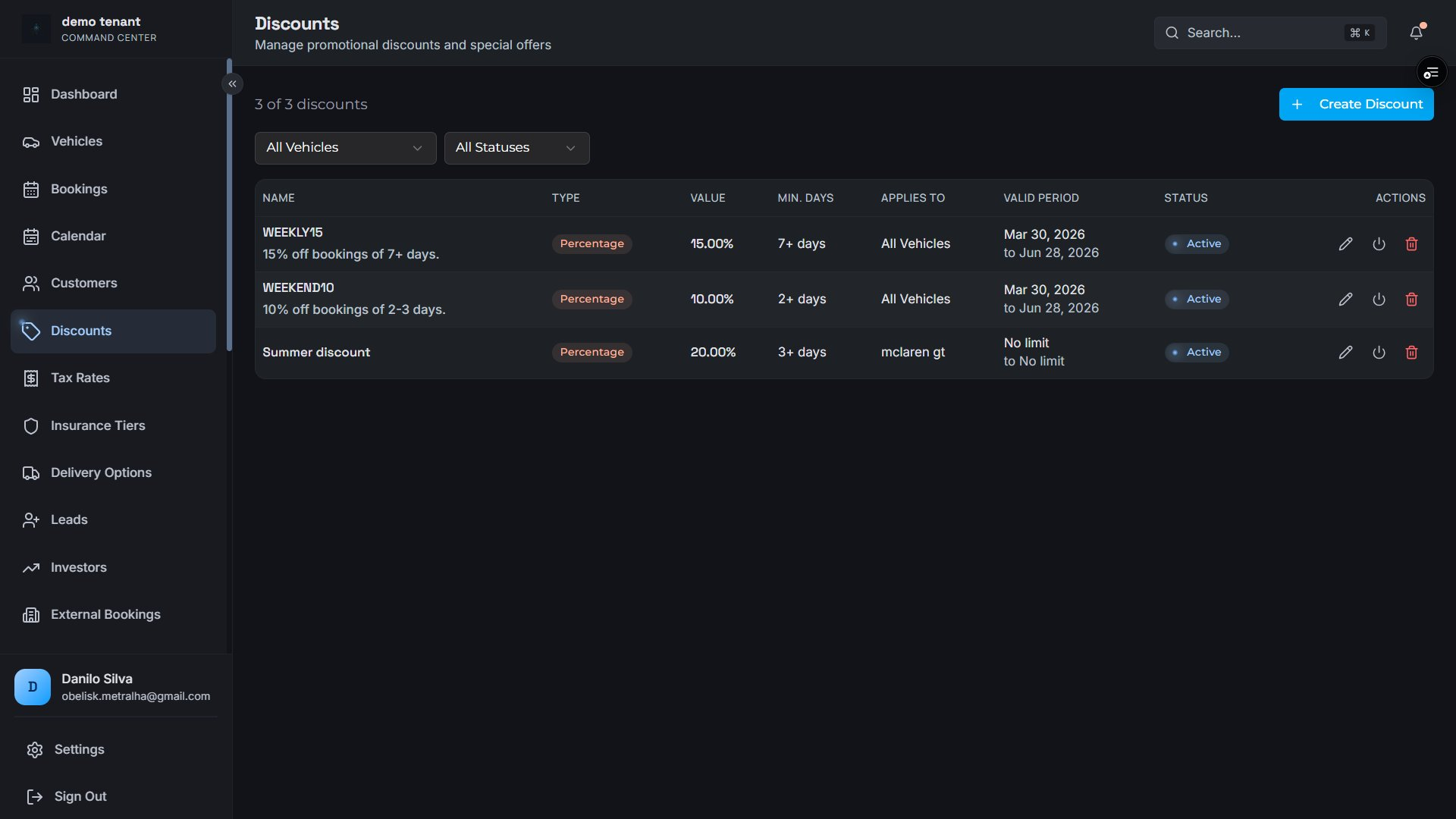
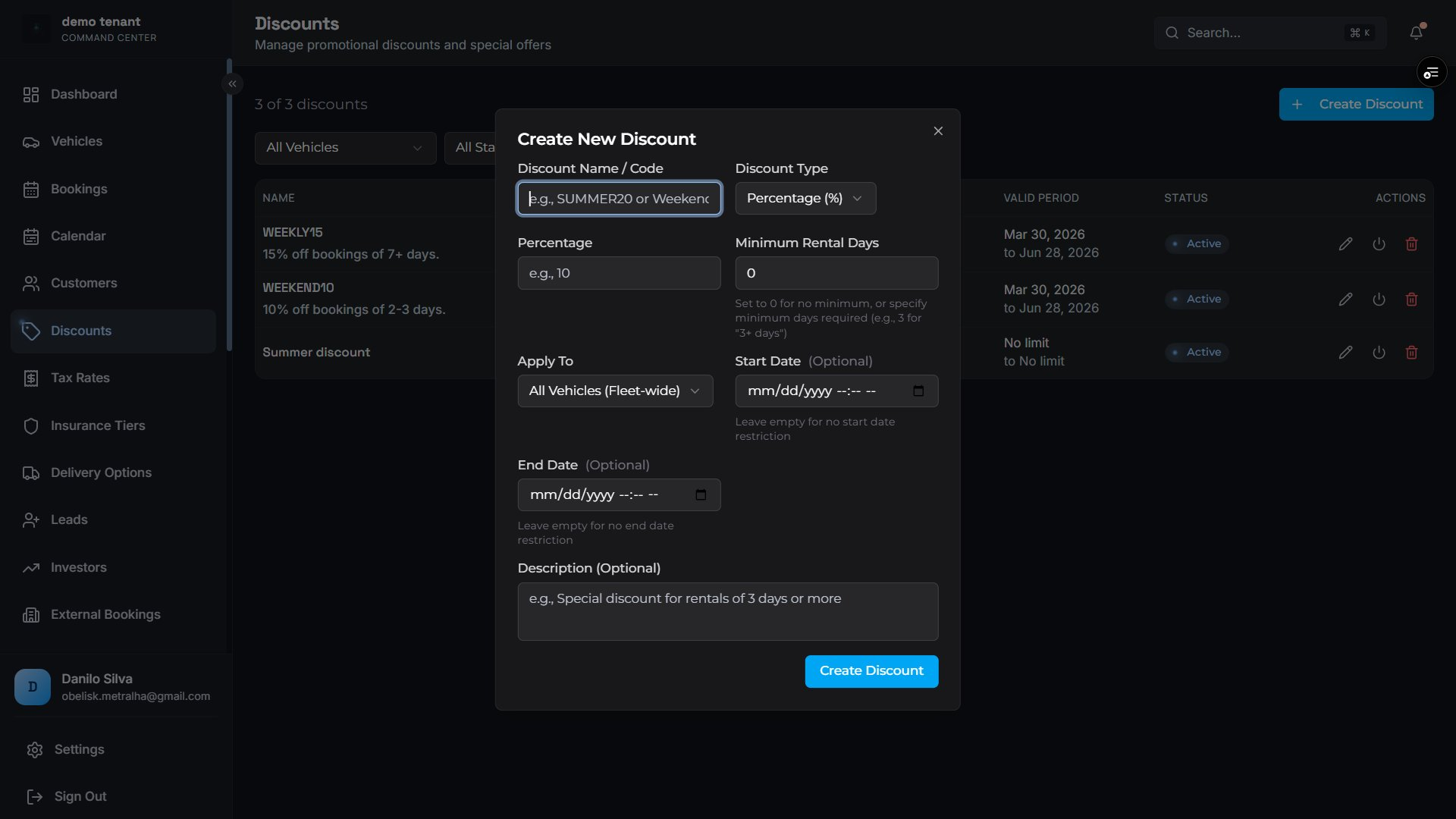
Flexible discount engine with percentage and fixed-amount codes, eligibility rules, time-limited promotions, and per-vehicle or fleet-wide applicability.
Snapshot-Based Billing
Rates locked at booking time — no retroactive surprises
When a booking is created, the daily rate, discount, tax rate, and insurance amount are snapshotted. Changing your pricing configuration never affects historical bookings.
Daily rate snapshot from vehicle at booking time
Subtotal, tax, discount, delivery fee, insurance — all stored
Remaining balance = total − deposit paid
Percentage or fixed-amount discount types
Minimum rental days & date range eligibility per code
Lamborghini Huracán EVO (3 days)$4,497.00
Premium Insurance (3 days)$375.00
Airport Delivery$150.00
Florida Sales Tax (7%)$314.79
WEEKLY15 discount (−15%)−$674.55
Total$4,662.24
Discount manager — filter by vehicle or status, see type, value, minimum days, validity period, and active state
Create discount — configure code name, type, percentage or amount, eligibility rules, and date range in a single modal
Revenue Ops
Tax Configuration
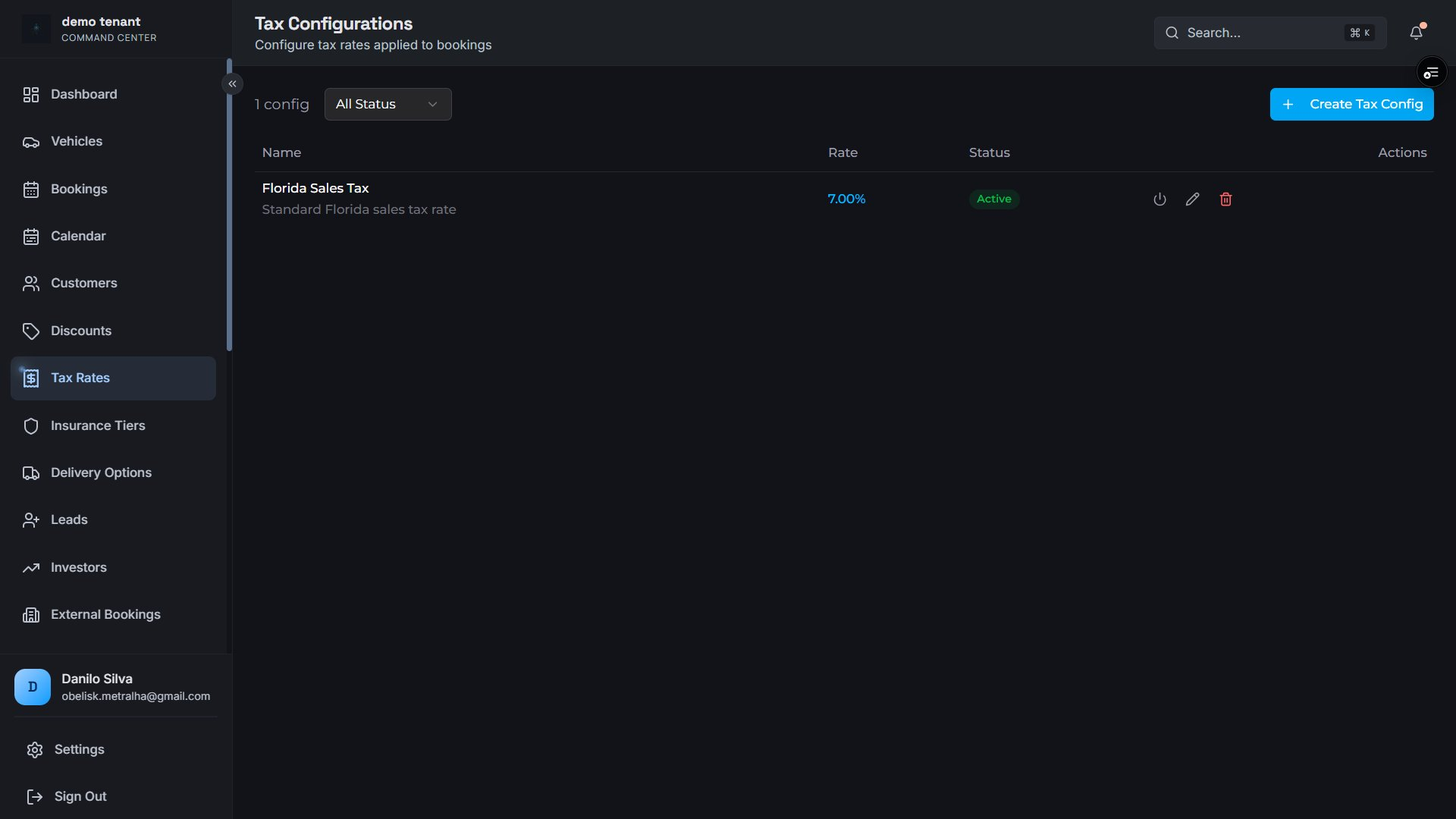
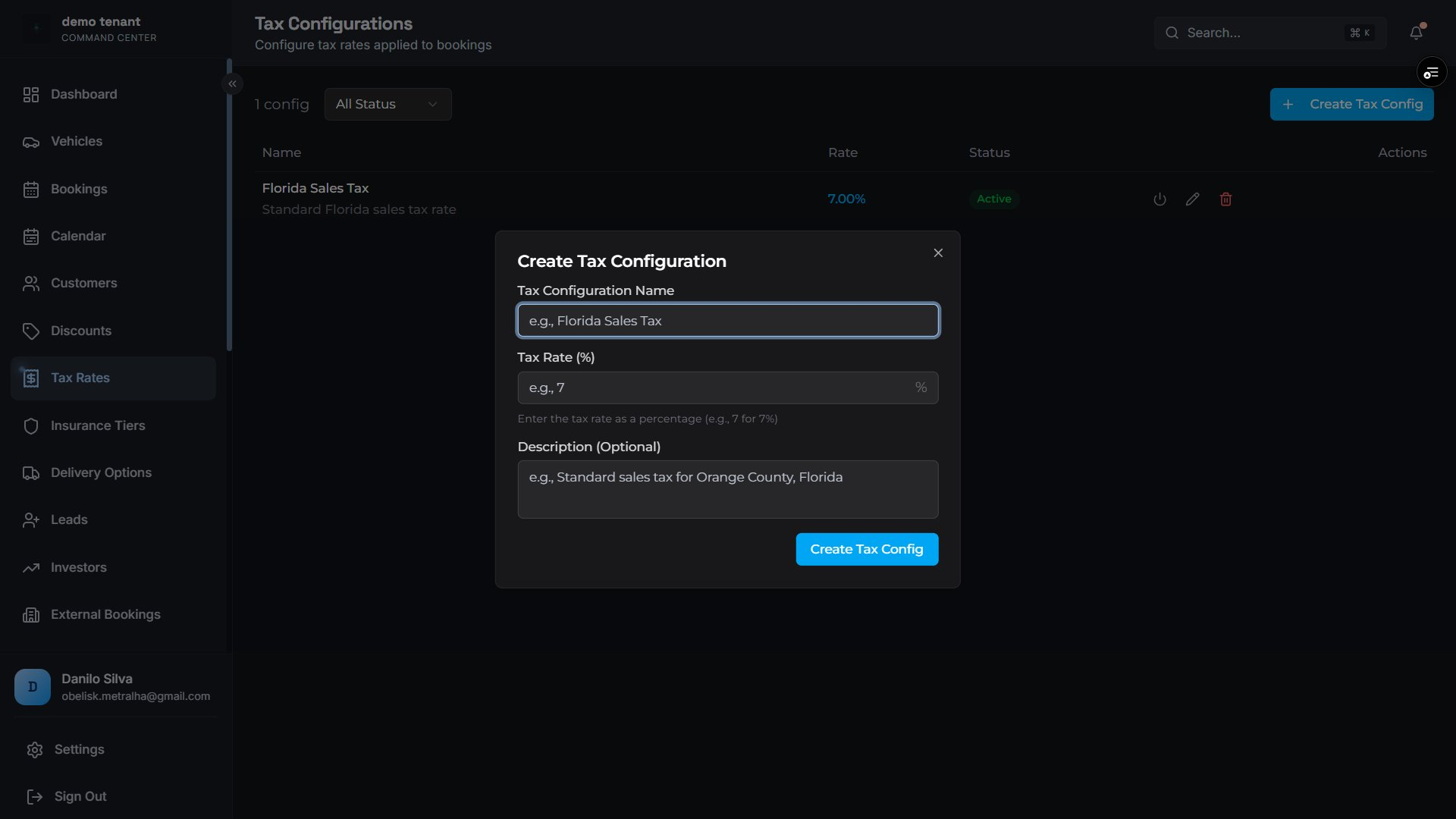
Define named tax configurations per tenant with high-precision rates. Tax amounts are snapshotted at booking creation and never retroactively affected by configuration changes.
Active tax configs — rate displayed with toggle and edit controlsCreate tax config — name, rate, and optional description
Operations
Insurance & Delivery Options
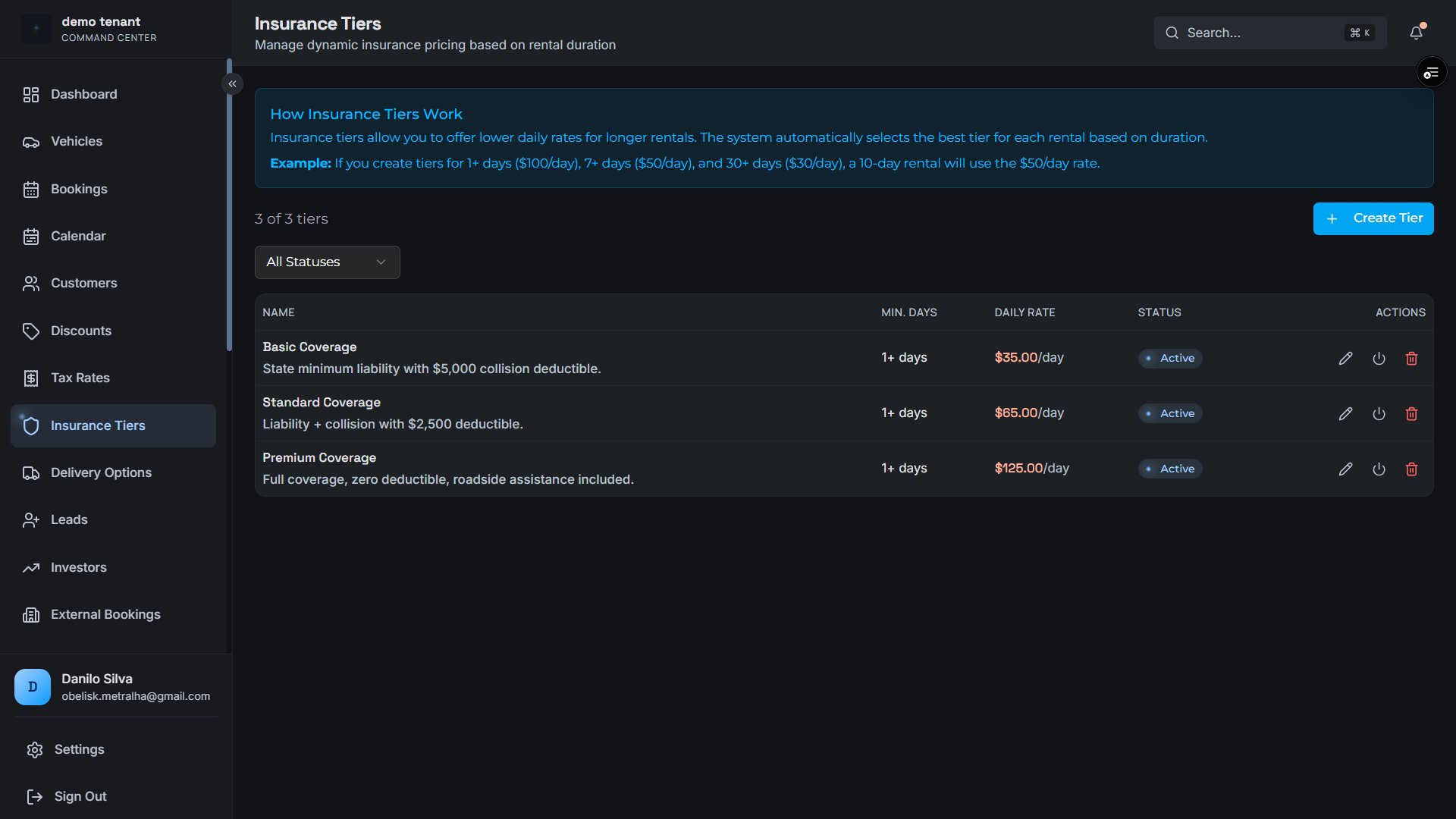
Offer tiered insurance packages and flexible delivery locations — all priced, tracked, and snapshotted into every booking at creation time.
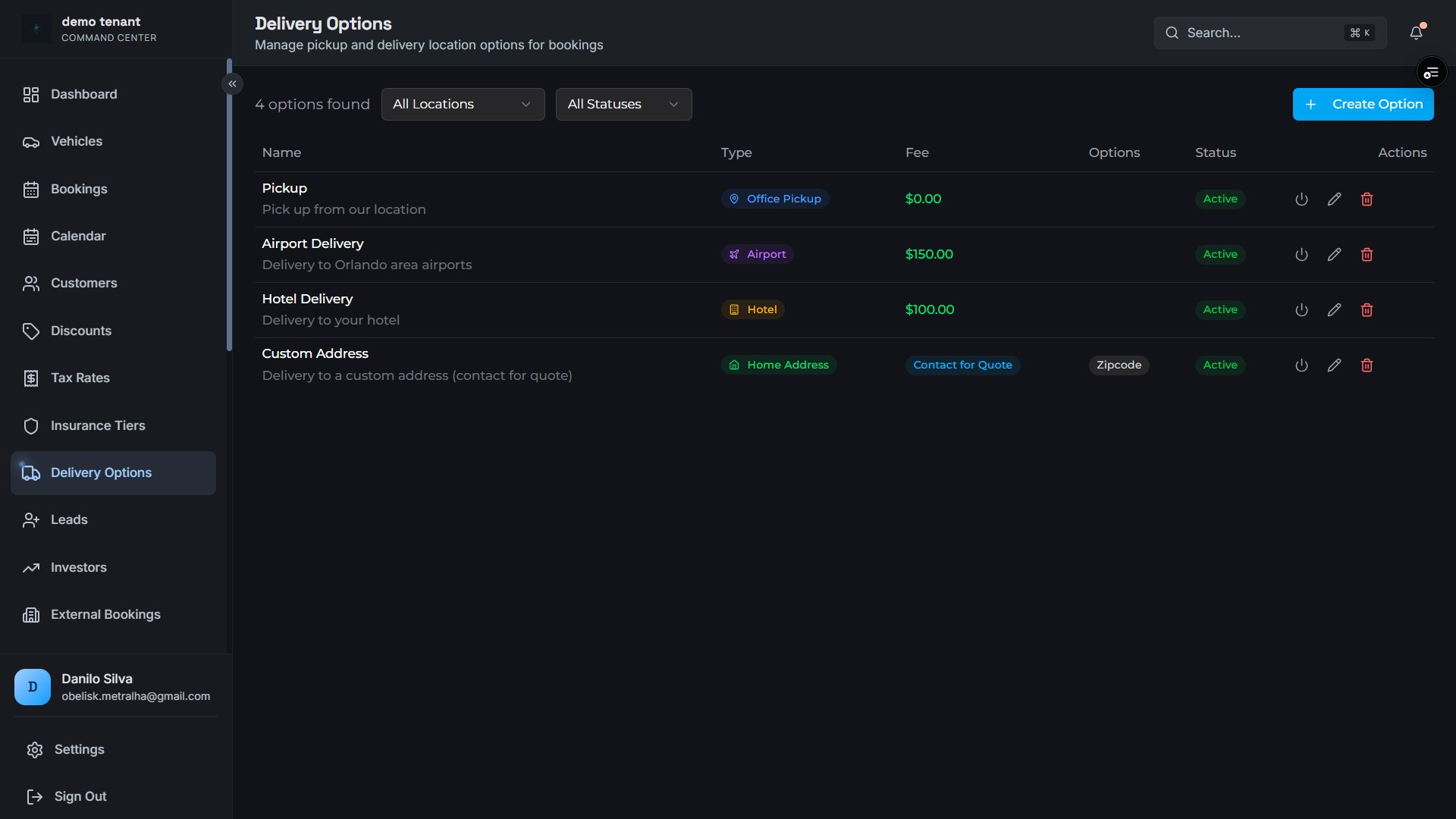
Insurance tiers — Basic, Standard, and Premium coverage with daily rates and minimum day requirements
Delivery options — Office Pickup (free), Airport ($150), Hotel ($100), and Home Address (contact for quote with zipcode requirement)
Revenue
Multi-Gateway Payments
Connect to the payment processor your business already uses — or switch anytime. All major gateways supported out of the box, with split deposit + final payment tracking.
STR
Stripe
Session ID · Payment Intent
SQR
Square
Checkout ID · Order · Payment ID
AUTH
Authorize.net
Transaction ID tracking
SHO
Shopify
Order ID · Checkout URL
Payment Status Lifecycle
Deposit and final payment tracked independently — clear state machine for your ops team.
UnpaidPendingPaidPartialFailedRefunded
Compliance
Contracts & E-Signing
Send, track, and store legally binding rental agreements directly from the booking record — powered by Dropbox Sign with a complete lifecycle audit trail.
Contract Dispatch
Send contracts to customers with one click directly from the booking view.
Template-based generation via Dropbox Sign
Customer signer name + email
Tenant co-signer support
One active contract enforced per booking
Contract Lifecycle
Track every stage from queued to fully signed with automated webhook updates.
Queued → Sent → Viewed → Signed
Decline: customer reason captured
Void, Expire, Cancel with reason logging
Idempotent webhook processing
Document Storage
Signed PDFs stored in Vercel Blob and accessible at any time from the booking record.
Signed PDF URL stored in cloud
Admin download endpoint
Manual contract upload for offline agreements
Full Timestamp Audit Trail
All contract timestamps stored: sent_at, viewed_at, signed_at, declined_at, voided_at, expired_at. Complete paper trail for every agreement.
QueuedSentViewedSignedDeclinedVoided / Expired
CRM
Customers & Lead Management
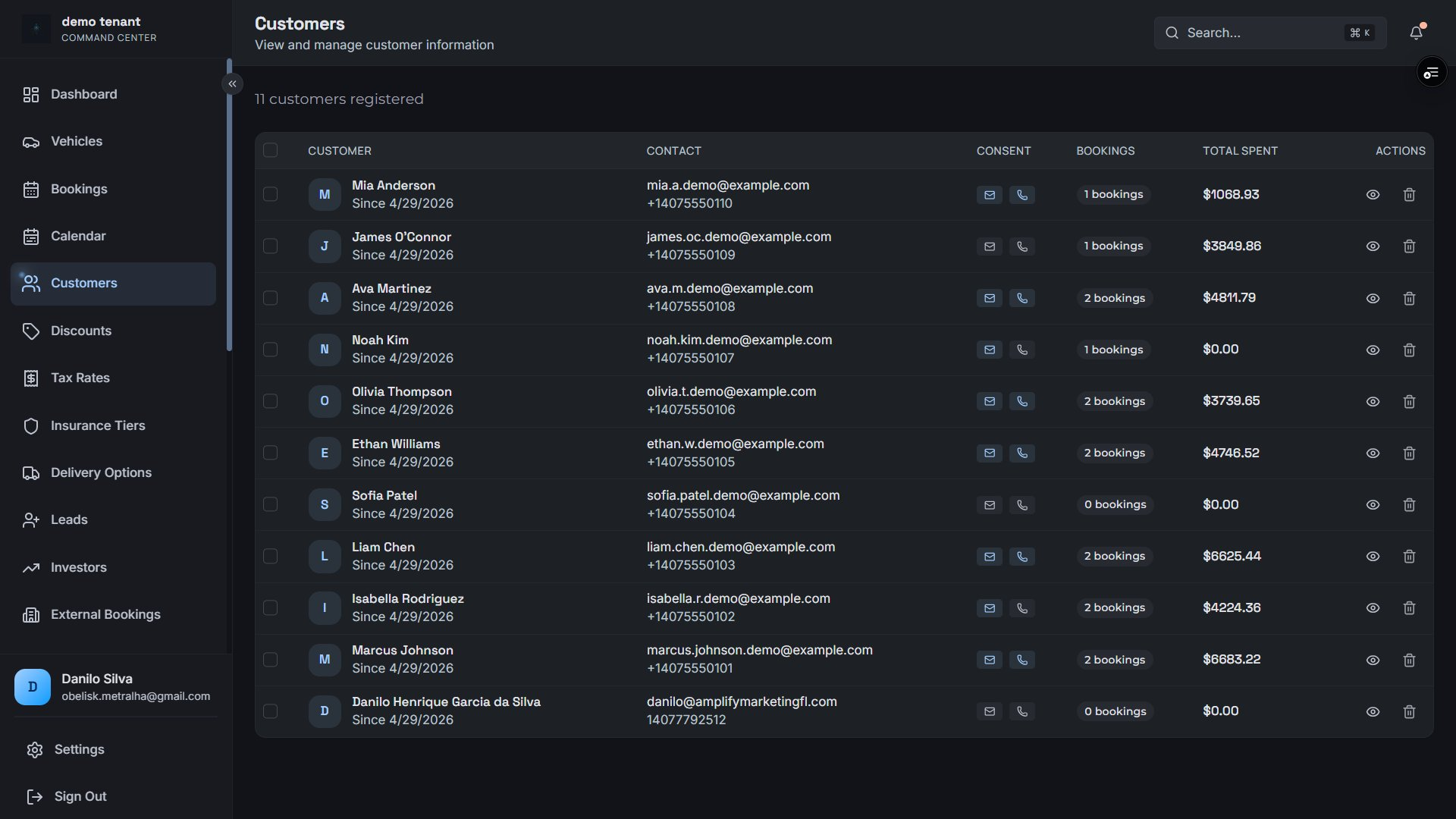
A built-in CRM layer — customer profiles with lifetime value tracking, automatic license extraction, Facebook lead pipeline, and investor inquiry management.
Customer registry — email & SMS consent tracking, booking count, and lifetime spend per customer
License OCR & Storage
Driver license data extracted automatically from uploaded images and stored on the customer profile.
License number, state, expiration, DOB, full name
Admin correction override
Reused automatically across future bookings
Customer LTV Tracking
Know your most valuable customers — lifetime bookings and total spend tracked automatically.
Total booking count per customer
Lifetime spend (sum of completed bookings)
Stripe customer ID linkage
Email + SMS consent with IP and timestamp
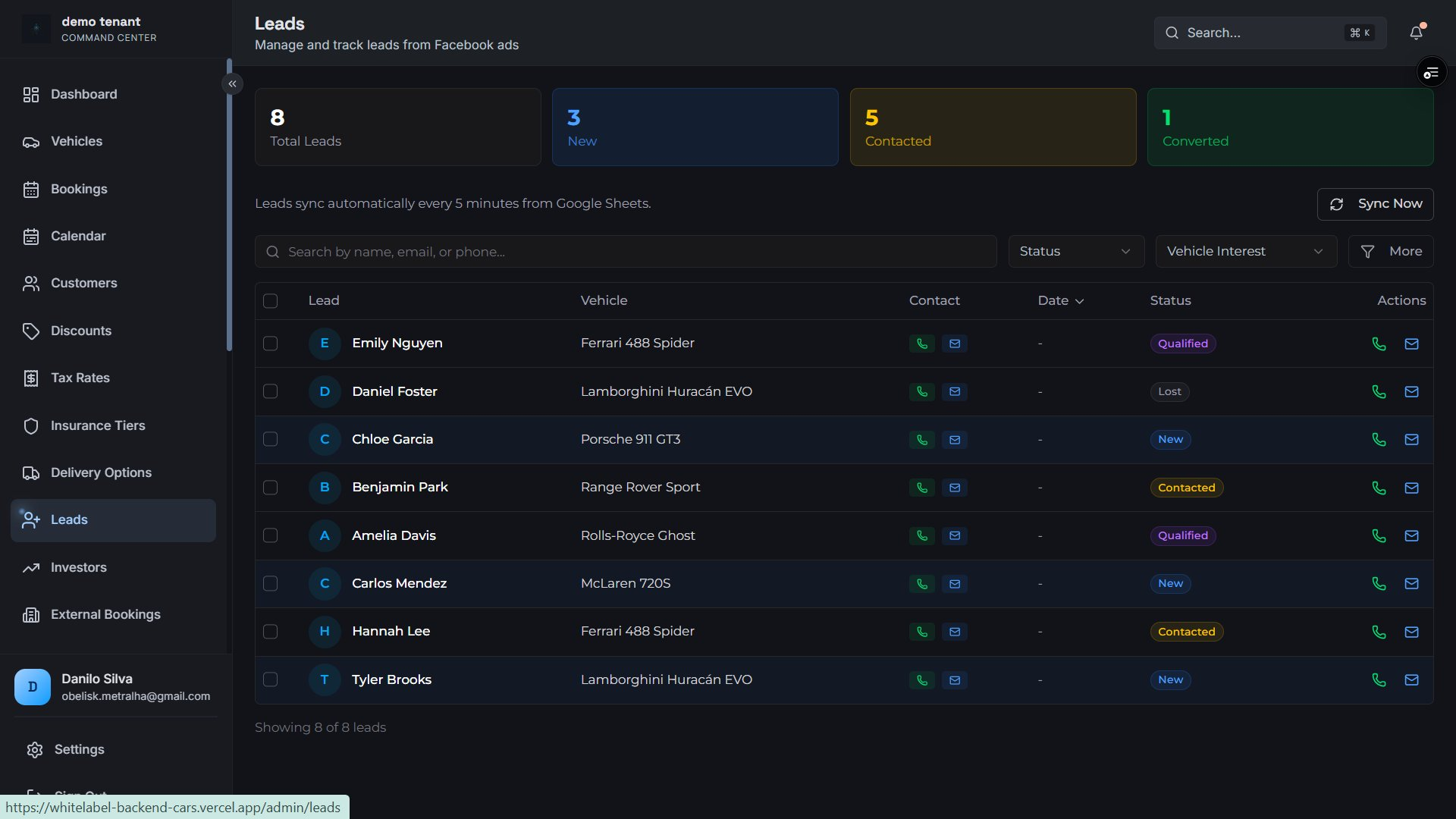
Lead Pipeline
Manage inbound inquiries from first contact to converted booking.
Status: new → contacted → qualified → converted
Vehicle interest, delivery preference, needed-by date
Lead assignment to sales team members
Facebook Lead & Google Sheet automatic sync
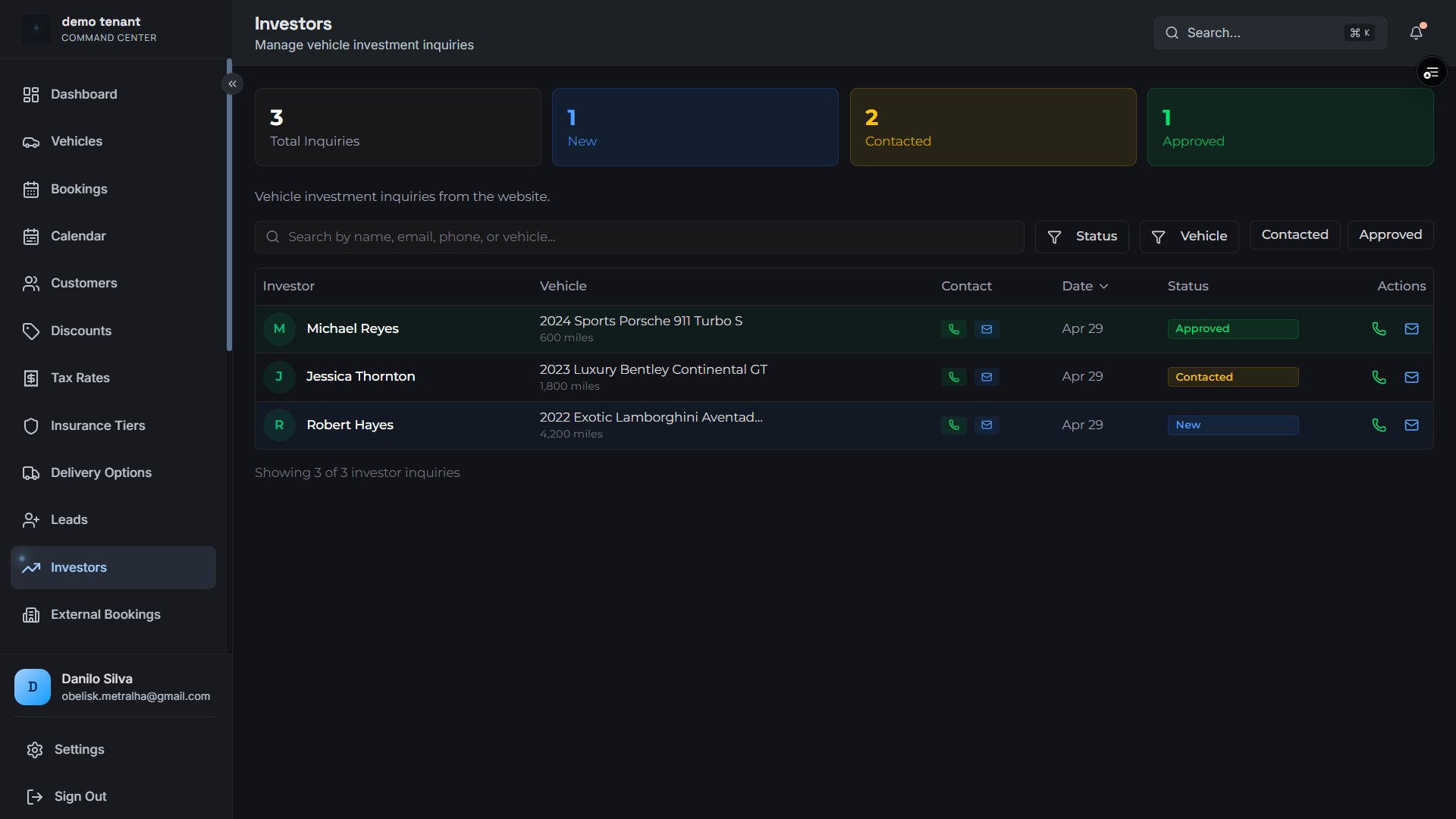
Investor Inquiries
Capture and manage investors looking to place vehicles in your fleet.
Vehicle specs: type, model, year, mileage
Status: new → contacted → approved / declined
Assignment + notes for team follow-up
Lead pipeline — auto-synced from Facebook & Google Sheets, with status and vehicle interest trackingInvestor inquiries — vehicle specs, approval workflow, and contact actions
Platform
Admin Dashboard
A unified operations center — manage fleet, bookings, staff, and configuration from the Command Center with role-based access controlling what each team member can see and do.
Super Admin Panel
Top-level controls for platform operators to manage all tenants from a single view.
Tenant CRUD: create, activate, deactivate
Super admin user elevation
Global API key management
Platform-wide feature flag rollout
Team & Role Management
Invite staff and control permissions with role-based access control.
Roles: owner, admin, staff
Multi-tenant user support
Default tenant assignment
User activation / deactivation
Feature Flags
Enable or disable platform capabilities per tenant — roll features out on your schedule.
Per-tenant feature enablement
Audit: enabled by user + timestamp
Keys: social_media, contracts, intake, and more
Enforced at the API layer — not just UI toggles
Tenant Settings
Key-value configuration store per tenant — change behavior without code deployments.
Arbitrary key-value configuration pairs
Description fields for team clarity
Updated timestamp tracking
Architecture
Multi-Tenancy & White-Label
Run multiple rental brands on one platform. Every tenant gets isolated data, branding, and configuration — sharing infrastructure, never data.
Complete Data Isolation by Architecture
Every database query is filtered by tenant_id at the CRUD layer. No tenant can ever access another tenant's vehicles, bookings, customers, or settings — enforced in code, not policy.
White-Label Branding
Each tenant operates a fully branded experience with their own domain, logo, and colors.
Custom logo upload
Primary brand color configuration
Custom domain assignment
Business name, address, and URL slug
Tenant Detection
The API identifies the tenant automatically from the request context.
Domain-based tenant resolution
X-Tenant-Slug header for public APIs
JWT-embedded tenant context
API-key-scoped tenant isolation
Per-Tenant Integrations
Each tenant configures their own gateways, e-signer, and email provider — encrypted and isolated.
AES-encrypted credential storage per tenant
Multiple integrations per service type
Per-integration activation / deactivation
Engagement
Communications & Notifications
Automated email and SMS triggered by booking events, outbound communication logging, and newsletter subscription management — all tenant-isolated.
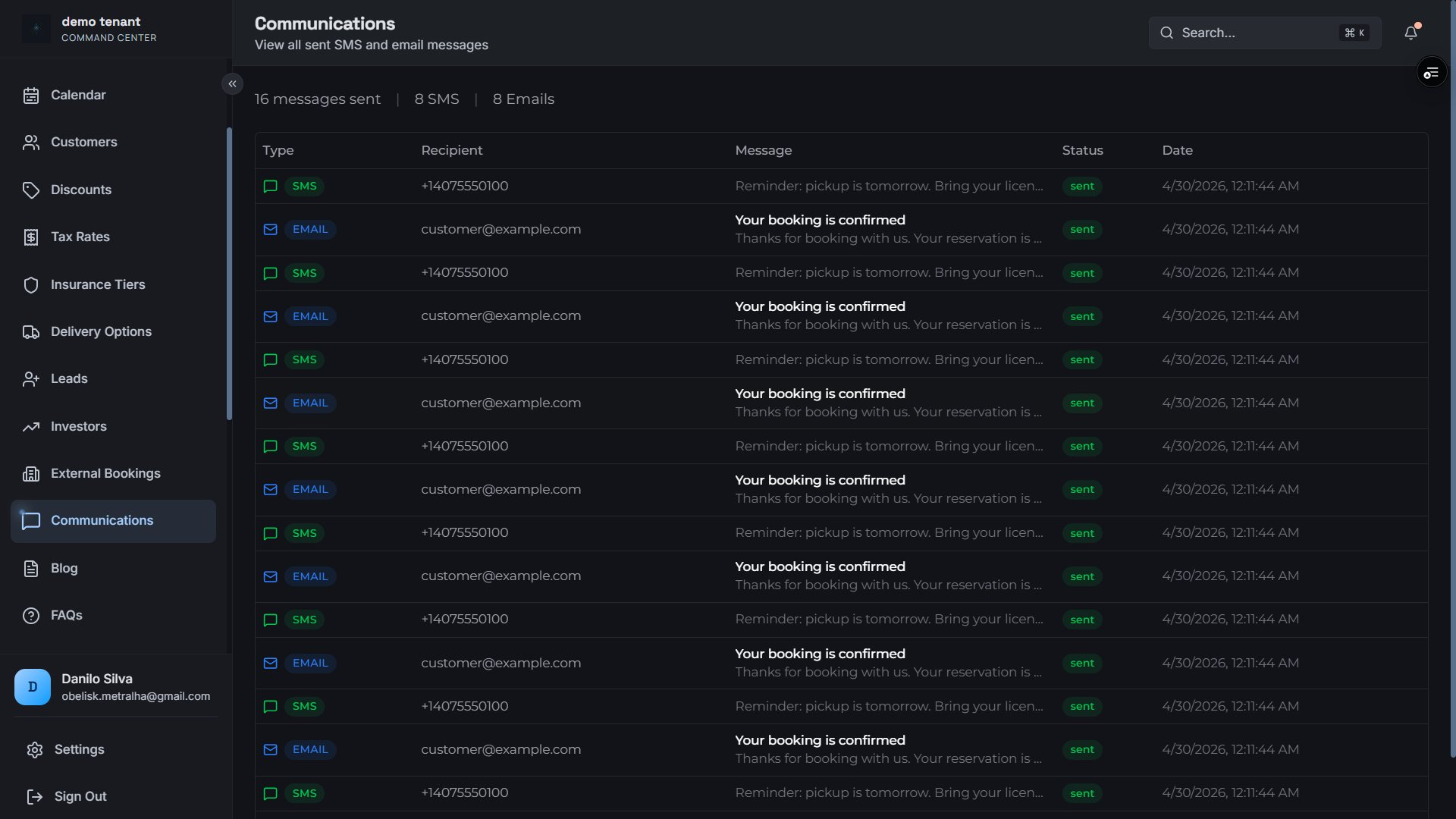
Communications log — all outbound SMS and email with type badge, recipient, message preview, status, and timestamp
Transactional Email & SMS
Automated messages triggered by booking events — booking confirmation, reminders, and admin notifications.
Booking confirmation to customer
New booking alert to admin
Status: pending → sent → failed → bounced
Consent verified before every send
Newsletter Subscriptions
Customers opt in to your newsletter directly from the booking flow or public site.
Email + SMS consent with IP and timestamps
Public subscription endpoint — no login required
Source tracking per subscription
Communications Log
Every outbound message logged and linked to booking and customer — full accountability.
Type: email, SMS, webhook
Recipient, subject, message preview
Sent-by user attribution + external provider ID
Marketing
Content Management & Blog
A built-in blog and FAQ engine — publish SEO-optimized content and manage customer FAQs without a separate CMS.
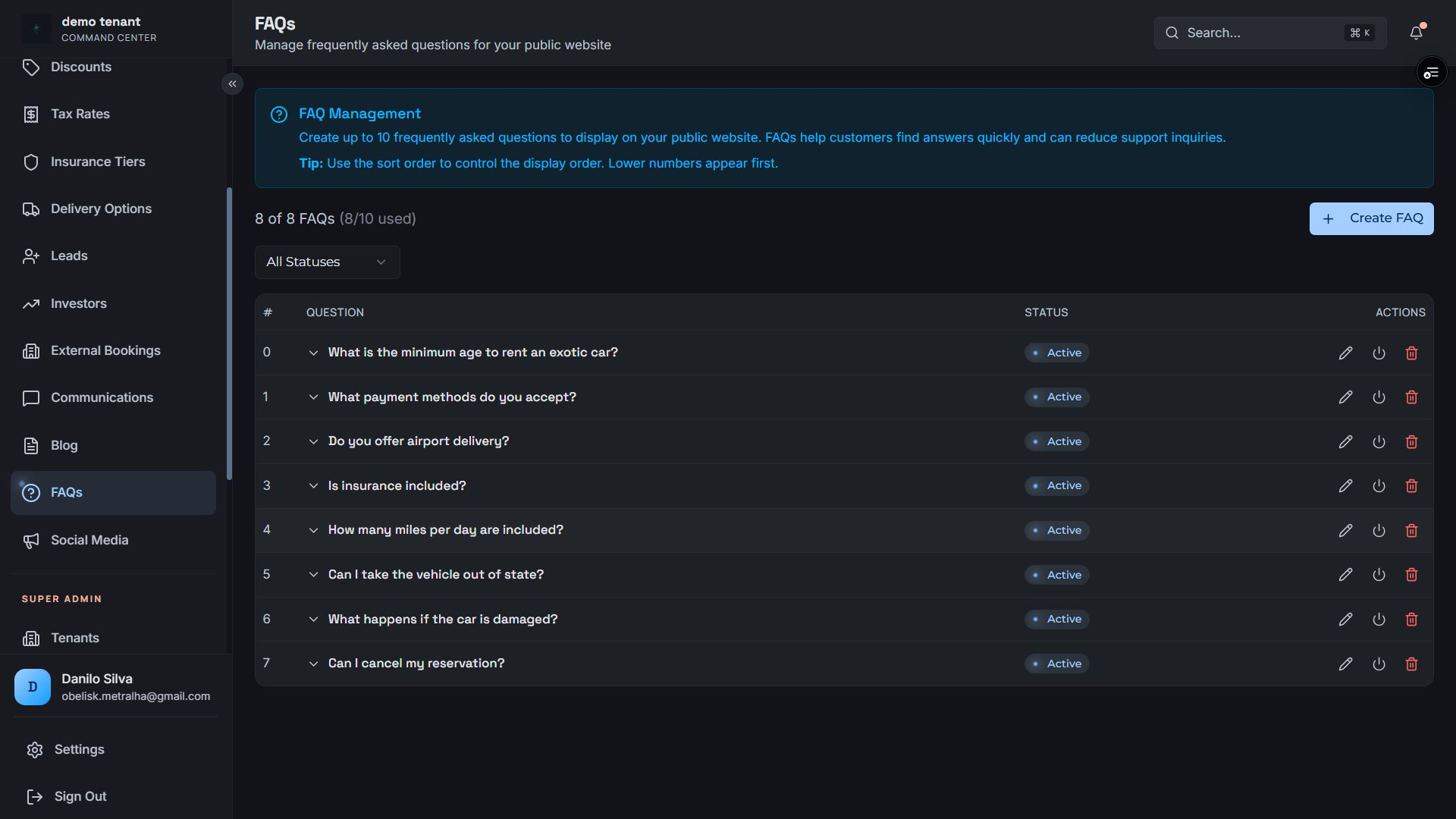
Blog manager — draft/published status, category, focus keyword, view countsFAQ manager — ordered questions (up to 10) with sort and toggle controls
Blog Management
Full blog CRUD with publish controls, SEO fields, categories, and view tracking.
Title, slug, excerpt, full content body
Featured image, category, tags array
Author assignment to team users
Meta title, description, focus keyword
Draft / published status with view count
FAQ Manager
Create and maintain an ordered FAQ list served publicly for your customers.
Question + answer storage
Sort order control (lower numbers first)
Active / inactive per entry
Public API — no login required to read
Marketing
Social Media Management
Generate and publish AI-composed Instagram posts from your vehicle gallery directly from the platform — with daily cap controls and full post history.
Social media — post history with status, AI image generation provider selection (Gemini or OpenAI), and one-click Instagram publishing
AI-Composed Posts
Generate captions and images for vehicle posts using Gemini or OpenAI — one click to publish.
Instagram publishing (extensible)
Image generated from vehicle gallery
Daily post cap per tenant
Gemini (fast/cheap) or OpenAI (higher fidelity)
Post History & Tracking
Track every post from queued to published with full history and error visibility.
Status: pending → completed / failed
External post ID + live URL
Success rate and monthly post count
Error message capture for failures
Developer
Public REST API
A fully documented REST API for connecting your frontend booking widget or custom integration. Vehicle and insurance endpoints are tenant-scoped via header. Booking endpoints require an API key.
Method
Endpoint
Auth
Description
GET
/api/public/vehicles/
X-Tenant-Slug
List all active vehicles
GET
/api/public/vehicles/:slug
X-Tenant-Slug
Get vehicle by slug
GET
/api/public/vehicles/:id/blocked-dates
X-Tenant-Slug
Blocked date ranges for availability calendar
GET
/api/public/insurance-tiers/
X-Tenant-Slug
List available insurance tiers
POST
/api/public/discounts/validate
X-Tenant-Slug
Validate and apply a discount code
POST
/api/public/bookings/
X-API-Key
Create a new booking from your frontend
GET
/api/public/bookings/:id/status
X-API-Key
Customer-facing booking status check
POST
/api/public/bookings/subscribe
X-API-Key
Newsletter subscription
GET
/api/health
Public
API health check
Interactive API Docs
OpenAPI / Swagger documentation available at /api/docs in non-production environments. Full request/response schemas with try-it-now support.
Security
Authentication & API Keys
Two authentication mechanisms — JWT sessions for your team, API keys for programmatic access. Keys are hashed at rest, role-scoped, and support expiration with last-used audit tracking.
JWT Session Auth
Seamless session management via NextAuth — no tokens to handle manually.
HttpOnly JWT cookie — XSS-resistant
Tenant + user context embedded in every request
Role validation middleware enforced at API layer
API Keys
Programmatic access keys for frontend integrations and server-to-server calls.
Full keys: user-owned, role-scoped, expirable
Public keys: frontend-safe, no expiry, tenant-scoped
Keys hashed at rest — never stored in plaintext
Last-used timestamp for audit
Request Security
Every request is fully scoped — no cross-tenant data leakage possible by design.
All queries filter by tenant_id at CRUD layer
Domain-based tenant resolution
AES-encrypted credential storage per tenant
Platform
Integrations & External Services
Connect the tools your business already uses — payment gateways, e-signing, email, AI, and social — each configured per tenant with encrypted credentials.
STR
Stripe
Payments
SQR
Square
Payments
AUTH
Authorize.net
Payments
SHO
Shopify
Payments
DBX
Dropbox Sign
E-Signing
SG
SendGrid
Email / SMS
IG
Instagram
Social Publishing
VBL
Vercel Blob
File Storage
OAI
OpenAI
AI Image / Caption
GEM
Gemini
AI Image / Caption
Encrypted Credential Storage
All integration credentials — API keys, tokens, secrets — are AES-encrypted at rest before being written to the database. Each tenant's credentials are independently encrypted and isolated.
AI-Powered
AI-Powered Tenant Onboarding
New rental businesses onboard through a guided, multi-turn AI conversation that collects business information, extracts structured configuration, and provisions their tenant automatically after super admin approval.
Conversational Intake
New tenants answer questions in plain language — the AI extracts structured configuration automatically.
Multi-turn AI conversation (OpenAI / Anthropic)
Structured field extraction with confidence scores
Full transcript and context stored per session
Token usage and cost tracked per session
Invite System
Control who can onboard with signed, time-limited invite tokens issued by super admins.
Cryptographically signed invite tokens
Expiration date + one-time use enforcement
Email and business name pre-population
Approval & Provisioning
Super admins review and approve intake sessions before tenant build begins.
Status: in_progress → finalized → approved → built

Social Media Management
Generate and publish AI-composed Instagram posts from your vehicle gallery directly from the platform — with daily cap controls and full post history.
Social media — post history with status, AI image generation provider selection (Gemini or OpenAI), and one-click Instagram publishing
AI-Composed Posts
Generate captions and images for vehicle posts using Gemini or OpenAI — one click to publish.
Post History & Tracking
Track every post from queued to published with full history and error visibility.